ADM 201 Exam Cost, Retake Fees, and Scheduling Rules
By PrepHoot Editorial Team· (updated Oct 28, 2026)

For adm-201, the useful budget includes the registration charge, preparation spending, and room for another attempt. Scheduling decisions matter too, especially when you’re fitting the Salesforce Administrator exam around a full-time job. This guide uses $200 as a planning allowance, not a verified current registration quote. Current retake prices and cancellation deadlines aren’t established here; use the amounts and terms displayed in your booking account before committing money.
The financial decision has two parts: how much cash you need to register, and how much you could spend before earning the credential. Keep those totals separate.
What the $200 planning allowance covers
The Salesforce Administrator exam allowance is one line in your budget. It doesn’t establish the price of training, practice materials, travel, or another attempt.
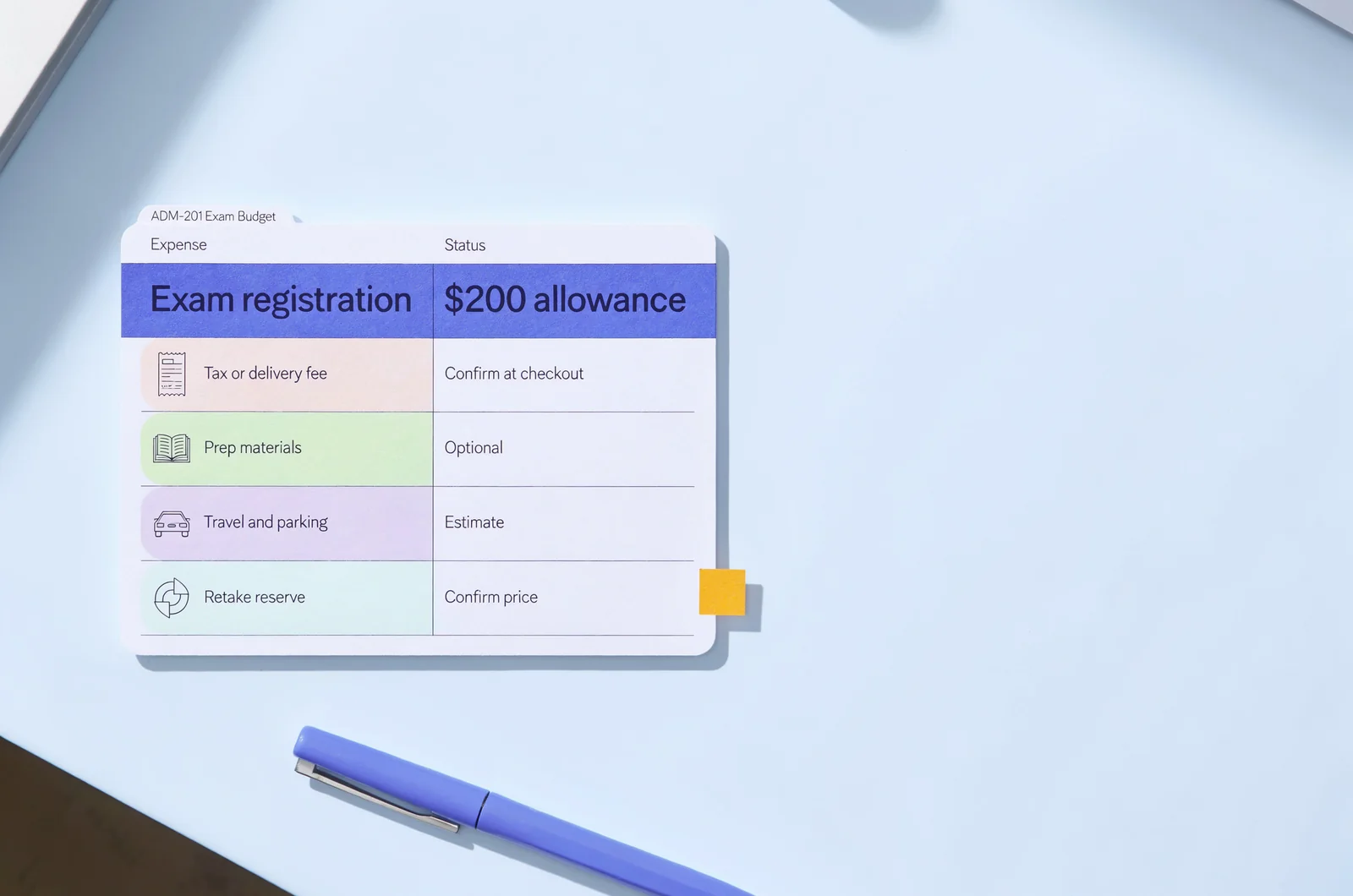
Start with the current registration amount displayed for the exact credential you intend to take. Match the exam title carefully rather than relying entirely on the shorthand used by a preparation website. Then record the currency, any listed tax, and the final payable total.
A useful budget separates these expenses:
- The first exam registration.
- Any tax or delivery charge actually listed at checkout.
- Optional preparation materials.
- Travel, parking, or other attendance expenses.
- A reserve based on the confirmed retake price.
I would keep optional preparation purchases outside the exam-fee line. Otherwise, it becomes difficult to tell whether a larger total reflects the credential itself or your study choices. The distinction between exam and preparation spending also makes an employer reimbursement request easier to explain.
A simple budget calculator could accept the confirmed exam fee, tax, preparation spend, travel, voucher value, and retake reserve, then show immediate cash needs and total possible spending.
Keep the calculation grounded in actual amounts. A discount you haven’t received and reimbursement you haven’t secured don’t reduce the money needed at checkout. Save the final payment summary alongside your budget.
Retake fees belong in the budget before booking
A Salesforce Administrator retake needs its own financial and scheduling check. A first-attempt allowance tells you nothing definite about what a later registration will cost.
Separate the retake price from eligibility
The retake price answers how much another attempt costs. Retake eligibility answers when you’re allowed to take it. A discounted price doesn’t establish immediate availability, and an available appointment doesn’t establish eligibility.
Before budgeting another attempt, establish the current answers to these questions:
- What price applies to your next registration?
- Is there a waiting period after an unsuccessful attempt?
- Does eligibility depend on how many attempts you’ve already made?
- Does a voucher or purchased package cover that attempt?
Avoid putting an assumed free retake into your budget. Count it only when the purchase terms explicitly include one.
Give the reserve a specific purpose
Your retake reserve should use the confirmed repeat-attempt charge, plus any expenses you would incur again. Travel may repeat; a preparation purchase with continuing access may not require another payment.
The study decision deserves equal attention. Before spending the reserve, use a structured practice test result review to distinguish knowledge gaps from pacing problems.
PrepHoot’s study and timed modes can support that distinction: explanation review addresses reasoning, while timed practice helps you examine how you allocate time. Neither establishes your eligibility to register again.
Write down what must change before another attempt. “Explain the access-control choices I keep confusing” is a more useful spending condition than “complete another practice test.” Keep the reserve available until that weakness has a clear study response.
Cancellation and rescheduling can affect different amounts
For a Salesforce exam appointment, cancellation and rescheduling are separate actions to investigate. One concerns ending a booking; the other concerns moving it. Their financial consequences depend on the applicable terms.
Turn the cutoff into a calendar entry
A policy written as hours before an appointment is easy to misread during a busy workweek. Convert the stated cutoff into an actual date and time as soon as you book.
Record the appointment’s time zone. Then add an earlier personal reminder so you can make the decision while you still have room to act.
Your booking record should answer:
- When does the permitted change window close?
- Is the cutoff measured in hours, calendar days, or another stated unit?
- What happens to the payment after that cutoff?
- How do you know a cancellation or change has completed?
A calendar reminder doesn’t change the provider’s deadline. Use the deadline stated for your appointment.
Check what happens to the payment
A cancellation may involve a refund question. A reschedule may involve a change fee or a retained payment. A missed appointment introduces another question: whether any payment remains available for a future booking.
Those outcomes need separate confirmation. Avoid treating a successful appointment change as evidence that every cancellation would receive the same treatment.
If work or illness disrupts your plans, use the designated booking or support process promptly. Save the confirmation and any case number. A message requesting a change doesn’t, by itself, prove that the appointment moved.
When an exception is requested, keep its financial outcome separate from your assumptions. Update the budget only after you receive a clear decision about the existing charge.
Choose exam delivery around your actual constraints
The practical cost of a Salesforce Administrator appointment depends partly on how you attend. Compare the delivery options currently available in your booking account against your work schedule, equipment, and location.
Account for the home setup
For a remote appointment, review the current technical and workspace requirements before paying. Check the supported equipment, connection requirements, identification process, and rules for the room you’ll use.
A quiet room at lunchtime may become unsuitable when other people return home. Work equipment can also require checks that a personal computer doesn’t, particularly if installation permissions are restricted.
Complete any required system check on the device and connection intended for the appointment. Resolve problems while you can still choose another arrangement.
Count the full attendance cost
For a test-center appointment, include travel, parking, and time away from work. Check the location and arrival instructions attached to the booking.
Compare both arrangements using the same question: can you reliably meet the requirements at the scheduled time?
Treat any delivery surcharge as a separate expense only when the booking process actually lists it. There’s no basis here for assigning a universal extra charge to either option.
Protect time around the appointment as well. A work meeting that ends immediately before check-in creates a scheduling dependency you can avoid. Reserve the required arrival or check-in period, the exam appointment, and reasonable travel time where applicable.
Keep the delivery instructions with your confirmation so that the person arranging your work coverage has the correct appointment window.
Vouchers are useful when their conditions fit your booking
An exam voucher can change what you pay, but its conditions determine whether it belongs in your Salesforce exam budget. A quoted saving has little practical value if you can’t apply it to your intended registration.
Before counting a voucher, establish its eligible exam, expiration terms, geographic restrictions, and treatment of retakes. Also check whether the deadline concerns purchasing, scheduling, or actually taking the exam. Those are different events.
Save the original terms with the voucher confirmation. A short promotional message may leave out conditions that affect your booking.
Pay particular attention to changes and cancellations. Establish what happens to the voucher if you move or cancel the appointment, and whether its original expiration remains relevant. Don’t assign a replacement value without explicit terms.
There is no established recurring discount calendar in this guide. Build your budget around an available, eligible discount rather than an expected future promotion.
Waiting for a discount is a scheduling choice too. Consider whether the possible saving is worth delaying a date that fits your preparation and work commitments. If a discount is attached to training, separate the package price from the exam value before comparing it with another option.
Apply the voucher before completing payment, check the resulting total, and retain the successful redemption record. Your budget should reflect the amount actually charged.
Keep preparation spending tied to a clear weakness
Preparation spending should have a defined job in your Salesforce Administrator budget. Identify what you need help with before adding another course, question bank, or subscription.
Use free material to diagnose the gap
Free questions can help you inspect the quality of an explanation and identify concepts that need more work. They also let you assess whether a resource suits the way you study.
PrepHoot’s free sample questions provide one starting point without requiring a full-access purchase. The useful question is whether you can explain why the selected answer fits the scenario and why the alternatives don’t.
For more detail on choosing material, compare Salesforce admin practice scenarios by how well they support that reasoning.
Repeated success on familiar questions can make a resource less useful for diagnosing remaining gaps. Record the concept you misunderstood, then practice applying it in a different scenario.
Compare access terms with your study calendar
For a one-time purchase, establish what access includes and how long it lasts. For a subscription, calculate the cost across the months you realistically expect to study.
Account for interruptions. A demanding work period may leave you paying for access during weeks when you barely use it. Set a review date before the next renewal and assess whether the resource still addresses an active need.
I would approve a preparation expense against one sentence: “This purchase will help me resolve this specific weakness.” Examples include understanding explanations, rehearsing pacing, or organizing repeated review.
Keep the resource price and the expected access period together in your budget. Revisit both when your exam date changes.
Make employer reimbursement specific enough to approve
Employer reimbursement changes who ultimately carries the exam cost. It may leave the initial payment entirely with you.
Request approval before purchasing whenever your employer’s process requires it. Include the credential name, the current quoted registration amount, the intended date, and the work-related reason for pursuing it.
A useful justification connects the learning to actual responsibilities. Depending on your role, that could include user access administration, reporting, data quality, or support for Salesforce users. Choose responsibilities that genuinely apply to your work.
Then separate the reimbursement questions:
- Does approval cover registration, preparation, or both?
- Are unsuccessful attempts eligible?
- Is a retake subject to separate approval?
- What receipts or result records are required?
- When should you expect repayment?
Keep time away from work in the discussion. Approval for an exam expense doesn’t establish approval for an absence.
Your cash budget should show the amount you must pay before reimbursement. Track the expected repayment separately, with its approval record and required documents. If repayment timing is uncertain, avoid assigning it to a specific paycheck.
Retain an itemized receipt that distinguishes registration from optional purchases. This makes it easier to match each charge to the approved expense category.
If your employer approves a spending limit, compare that limit with the payable total before registering. Resolve any difference while the purchase is still pending.
Questions to settle before paying
These Salesforce Administrator booking questions connect the budget to the appointment you’re about to purchase.
Is $200 enough for the whole certification budget?
The $200 amount here is a planning allowance for the first exam charge, not a verified all-in total. Replace it with the current checkout amount. Then add applicable tax, chosen preparation, attendance expenses, and a separately confirmed retake reserve.
Does the first payment include another attempt?
Count another attempt as included only when the purchase terms explicitly say so. Establish which exam it covers, when it can be used, and whether any eligibility or expiration conditions apply. Otherwise, keep the retake as a separate budget item.
How late can I change the appointment?
Use the current deadline attached to your booking. This guide doesn’t establish a universal cancellation or rescheduling window. Record the actual cutoff, its time zone, and the financial consequence of missing it.
Should I book before reimbursement is approved?
First establish whether your employer requires advance approval. If you choose to pay while reimbursement remains unresolved, budget for carrying the full charge yourself. Keep the booking decision separate from an expected repayment.
What should I save after registration?
Keep the payment receipt, appointment confirmation, delivery instructions, applicable change terms, and any voucher conditions. Check that the exam, date, time zone, and delivery arrangement match your intention.
Enter the appointment and its change deadline in your calendar immediately after confirming those details.
Apply the same budget checks to other exams
Try the free sample questions, then create a free account or purchase full access or a membership for the exam they are preparing for. Get started |  |