Cisco 100-890 Exam Topics: A Complete Readiness Checklist
By PrepHoot Editorial Team· (updated Oct 29, 2026)
If you’re searching for 100 890 certification exams, start with the exam’s status: Cisco 100-890 CLTECH retired on February 9, 2025. Cisco names 800-150 FLDTEC as its replacement in its retired certification exam list. You can still use the historical topics to audit collaboration support skills, but your preparation for a current certification needs the replacement exam’s objectives.
This checklist covers the historical collaboration environment, endpoint hardware, and service knowledge objectives. The goal is concrete: identify what you can explain or demonstrate, record what needs work, and direct your study time toward those gaps.
Use the retired syllabus for the right purpose
The historical 100-890 syllabus remains a useful framework for reviewing collaboration support knowledge. Give that review a clear purpose before you spend time on individual devices.
For workplace development, choose examples that match the equipment you support. For historical CLTECH study, keep the original objective numbers attached to your notes. For a current certification, map any useful knowledge to the exam you intend to take.
As of October 2026, Cisco describes 800-150 FLDTEC as covering routing, switching, data center, UCS, and collaboration platforms. Its scope includes hardware identification, cabling, backup and restoration, and software upgrades or downgrades. See the current field technician exam for that broader scope.
Create separate pages for historical CLTECH coverage and your current certification requirements. A completed collaboration checklist should have a clearly defined place in your preparation.
Keep purchasing decisions tied to that distinction, too. A resource labeled 100-890 may help you review historical material; assess its coverage against your actual study goal before paying for access.
Create a readiness record for every objective
A useful 100-890 audit needs evidence beside each topic. Familiar wording and recognizable answer choices can make a weak area feel finished.
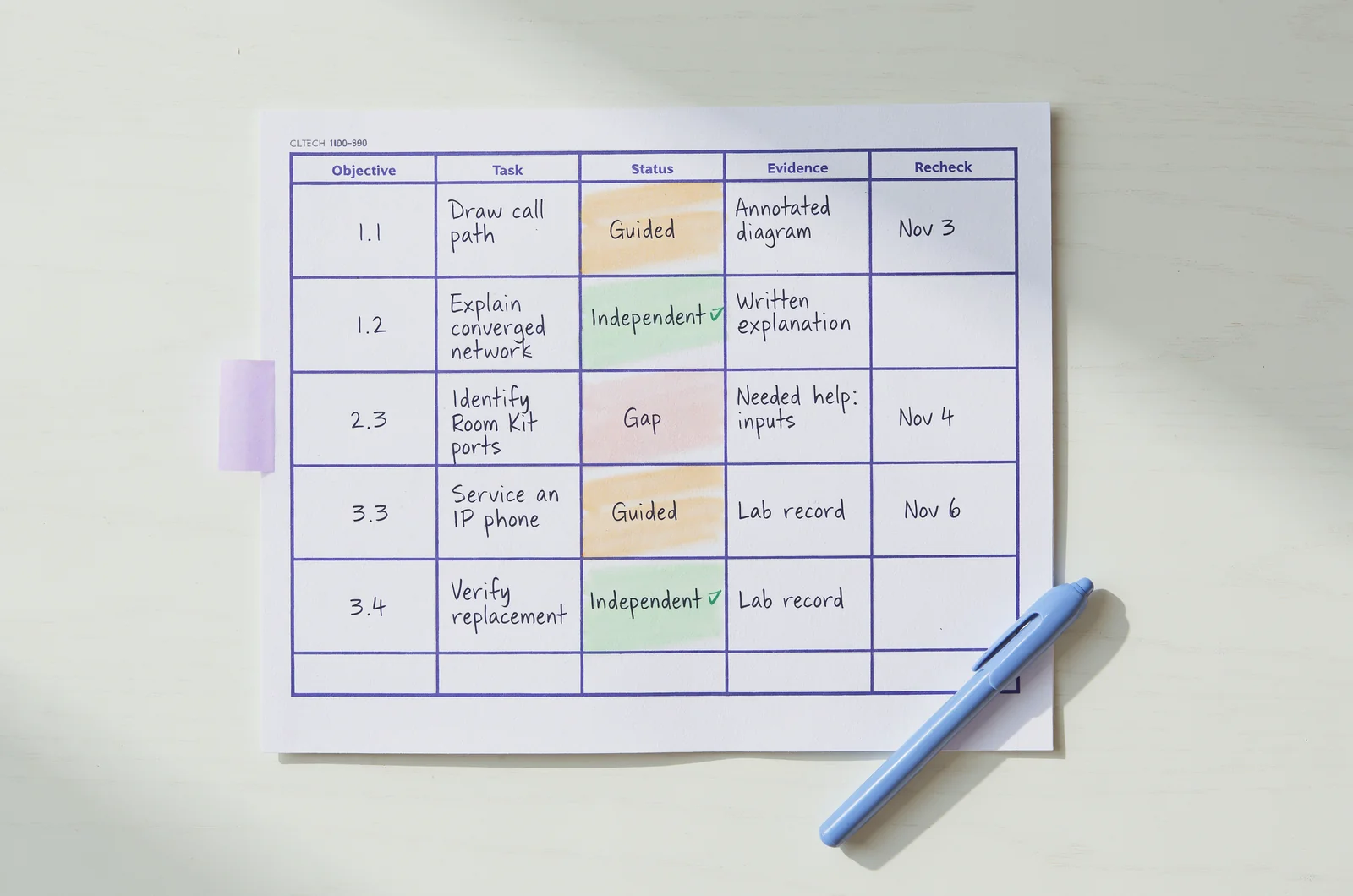
I’d use three study labels: gap, guided, and independent. A gap means you cannot yet explain the topic. Guided means you can complete the task with instructions. Independent means you can explain your reasoning and produce the expected result without prompts.
Run this short checklist across the historical objectives:
- Copy the objective number and its action verb into your notes.
- Turn it into a task, such as explaining a system role or identifying a connector.
- Attempt the task without opening your study material.
- Save evidence and record the exact point where you needed help.
- Recheck that point in a later session using a different example.
Useful evidence includes an annotated diagram, a written explanation, or a completed lab record. Keep the evidence specific enough that you can judge it again next week.
For question practice, use a practice test results review to turn missed answers into objective-level tasks. Record why your answer failed and what evidence would support the correct choice.
A compact interactive checklist could store each objective, confidence label, evidence note, and recheck date. Its useful output would be the remaining gaps rather than a predicted exam score.
Explain the collaboration environment without notes
The historical CLTECH blueprint assigned 35% to the collaboration environment. Its five objectives covered VoIP infrastructure, converged networks, Cisco collaboration solutions, CUCM, and Cisco Meeting Server with TelePresence Management Suite. These are historical weights from the CLTECH v1.0 exam topics.
Draw the infrastructure behind a call
For objectives 1.1 and 1.2, sketch a simple voice or video environment. Label the endpoints, network connections, and supporting systems.
Explain how the pieces relate. Then introduce a hypothetical symptom, such as a powered-on endpoint that cannot complete a call. Identify what your diagram tells you and what information you still need.
Your finished state is a diagram you can explain aloud without reading a definition. Give every line a purpose; remove connections you cannot justify.
Place the collaboration systems correctly
For objective 1.3, describe the Cisco collaboration technologies and solutions in your historical study materials. Organize them by their documented purpose.
For objective 1.4, explain Cisco Unified Communications Manager, commonly shortened to CUCM. For objective 1.5, write separate explanations for Cisco Meeting Server and TelePresence Management Suite.
Check those explanations against the relevant product documentation. Include a task associated with each system and an example of information a technician might need from it.
If your explanations sound interchangeable, keep those objectives marked guided.
Explain the support boundary
Add a fault-location exercise to your diagram. Describe what you would inspect at the endpoint and what evidence you would pass to someone responsible for another system.
For example, record the affected device, the symptom, and whether another endpoint has the same problem. Keep observations separate from suspected causes.
Finish this section with one written handoff that another technician could understand without asking you to reconstruct the situation.
Identify the endpoints and their connections
The historical hardware domain carried 20% of the CLTECH blueprint. Audit the named equipment families individually so familiarity with one room system does not conceal gaps elsewhere.
Cover all eight hardware objectives
Use these historical objective groups as your inventory:
- 2.1: Desktop Series DX70, DX80, and Desk Pro.
- 2.2: Webex Board 70, 70S, and 85S.
- 2.3: Room Kit USB, Kit, Kit Mini, Kit Plus, and Kit Pro.
- 2.4: Room 55 Single and Dual, plus Room 70 G2.
- 2.5: Room Panorama 70 and 70D.
- 2.6: MX200 G2, MX300 G2, MX700, MX800, SX10, SX20, and SX80.
- 2.7: TelePresence IX-5000.
- 2.8: Collaboration peripherals.
These names come from the historical hardware objective list. Treat them as the equipment coverage for this audit.
For each group, assemble a labeled image or diagram from appropriate documentation. Identify the main unit and the attached components shown in that specific configuration.
Hide the labels and repeat the exercise. Record any models or components you confuse.
Prove identification through a connection explanation
For each example, explain the documented connection path from component to component. Trace power, network, audio, video, and control connections where they apply.
Use the documentation for the exact model. Avoid transferring a connector arrangement or replacement procedure from another device because the systems look similar.
Then try a reverse exercise: start with a port or cable and identify what belongs at each end. State its purpose and the document that confirms your answer.
For the peripherals objective, include the accessory’s role and its connection to the main system. A recognizable photograph alone is weak evidence of service readiness.
If you lack equipment access, mark image identification and physical practice separately. You can complete the visual exercise while keeping hands-on work visible as an unresolved task.
Choose a service action and prove it worked
The historical service knowledge domain carried 45%. Its four objectives addressed network tools, collaboration product service, IP phone service, and hardware replacement. Cisco’s CLTECH course outline also describes supporting exercises such as device access, backup and restore, software management, and test calls.
Select a tool with a specific question
For objective 3.1, begin with the information you need. Name the tool, describe the result you expect, and explain what that result would establish.
Use a hypothetical endpoint fault to practice. Decide whether your immediate question concerns a physical connection, an address setting, device status, or another observable condition.
Write down the limits of each result. What would you still need to check before changing anything?
Your finished state is a short investigation plan in which every tool has a purpose. Replace entries such as “check the network” with an observable test and an expected finding.
Describe access and maintenance accurately
For objective 3.2, use an authorized lab or a documented walkthrough to practice reaching a device’s management interface.
Explain your access method, the information required, and how you confirm you reached the intended device. A command-line interface, or CLI, is one access method described in the historical training.
Choose a maintenance task from your study material. Record the starting state, required files or information, intended change, and verification procedure.
For backup, restoration, software changes, resets, or password changes, follow the procedure for the specific device and software version. Keep your notes attached to that version.
Mark the exercise guided if you can follow instructions but cannot explain their order or expected results.
Give IP phones their own service exercise
For objective 3.3, prepare a separate IP phone scenario. Record the model and define the symptom before choosing an action.
A useful practice case might involve a phone that has power but cannot complete the intended call. Describe the observations you would collect and the documented checks you would perform.
Distinguish a visible symptom from a diagnosis. “The phone cannot place the test call” is an observation; a proposed cause still needs evidence.
Finish by writing the result that would justify closing the service task.
Verify a replacement from preparation through handoff
For objective 3.4, write a hardware replacement plan using the relevant service instructions. Include identification of the existing part, the proposed replacement, and the connections involved.
State what configuration information or backups the procedure requires. Record any model-specific handling instructions before describing removal.
Then define the post-replacement checks. For a hypothetical meeting room exercise, these might include a test call and checks of the audio, video, and content functions used in that room.
Close the exercise with a service note that names the change, the checks completed, and any unresolved symptom.
Fit the remaining gaps into a working week
Your CLTECH audit should produce a manageable study queue. Prioritize a gap that prevents you from completing several exercises, then choose a task small enough for one evening.
Assign one result to each session
A practical weekly pattern could include an environment diagram session, a hardware identification session, and a service walkthrough. Keep another session for mixed questions and review.
Define the output before you begin. “Annotate the connections on one room system diagram” gives you a clear stopping point. “Study collaboration” leaves the scope open.
PrepHoot’s study mode and answer explanations can support question review. After a missed answer, write the objective it relates to and explain why the alternative you chose fails.
Keep that note brief enough to revisit during the next session.
Separate recall practice from pacing practice
Use flashcards versus timed exams to decide what a practice session should measure. Choose recall work for names and relationships; choose a timed session when you want to examine your pace and decisions under a clock.
PrepHoot’s flashcard and timed modes can fit those separate exercises. Set a purpose before opening either mode.
Afterward, distinguish a knowledge gap from a reading error or a rushed decision. Assign each problem a different follow-up task.
Reserve your final study block for rechecking earlier gaps with changed examples. Keep an item open when the result depends on remembering a familiar question.
Resolve retirement and readiness questions
The distinction between historical CLTECH knowledge and current certification readiness affects how you interpret every result in this checklist.
Can I still schedule Cisco 100-890?
No. Cisco lists February 9, 2025 as its last day to test and identifies 800-150 FLDTEC as the replacement. Retired exams are unavailable for certifying or recertifying, according to Cisco’s exam retirement guidance.
Keep any scheduling decision attached to the current exam code.
Does a strong CLTECH practice score establish FLDTEC readiness?
A CLTECH score measures performance on that practice material. It leaves coverage of the replacement exam’s other subjects unresolved.
Compare your evidence with the current FLDTEC objectives before judging overall readiness. Transfer relevant knowledge into the new plan, then create separate tasks for uncovered objectives.
Keep historical domain weights out of your current exam study allocation.
What if I recognize the equipment but struggle with service tasks?
Record those as different results. Hardware recognition can be independent while the related maintenance exercise remains guided.
Choose one documented service task and explain its starting state, procedure, and verification. Repeat it later without prompts where practical.
Can I finish the audit without owning the devices?
You can review diagrams, explain system roles, and write service plans without owning equipment. Keep the kind of evidence visible.
Use an authorized lab when available, or document a walkthrough when it is not. Label physical tasks you have not performed so your readiness record shows exactly what remains.
Practice recall and review missed answers
- How to review practice test results before a retake
- Flashcards versus timed exams for recall and pacing
- ADM 201 Exam Cost, Retake Fees, And Scheduling Rules
Try the free sample questions, then create a free account or purchase full access or a membership for the exam they are preparing for. Get started |  |