CompTIA Security+ Practice Test Timing Changes With SY0-701
By PrepHoot Editorial Team· (updated Oct 9, 2026)

As of October 8, 2026, CompTIA's Security+ page lists Security+ V7, the SY0-701 exam, as available now. The same page says the next version, Security+ V8, is expected on or around November 17, 2026. That's about 40 days away, which is close enough to change how you plan a timed run. The security+ timed practice exam tips below separate what CompTIA has confirmed from what's still open. They then show how to re-run a full-length practice test so your pacing holds up.
The clock itself is a maximum of 90 questions in 90 minutes, and nothing cited here reports a change to that limit. The pressure comes from the mix. Performance-based questions (PBQs) are tasks where you configure, match, or troubleshoot something instead of picking a letter. They take longer than a multiple-choice item and draw from the same 90 minutes. A practice test that ignores that split can leave you feeling ready when you aren't.
What CompTIA has confirmed, and what it hasn't
Practice-test pages tend to blur confirmed facts with guesses, so here's the split, with dates and source status.
What's confirmed:
- CompTIA's Security+ certification page says V7 is available now and V8 is expected on or around November 17, 2026. The word "expected" matters, so treat the date as a target, not a promise.
- The same page says V8 expands coverage of areas such as AI-related risks, security operations, and modern environments.
- CompTIA's published exam objectives describe SY0-701 as a maximum of 90 questions, a mix of multiple-choice and performance-based items, 90 minutes, and a passing score of 750 on a 100 to 900 scale. Check that the exam code on the cover reads SY0-701 before you rely on any copy.
CompTIA's page also gives the plainest guidance for anyone close to ready:
If you're ready to certify now, V7 remains a strong option.
— CompTIA, Security+ certification page
What the cited sources leave open:
- V8's exam code, question count, time limit, and PBQ share.
- The date V7 stops being offered.
- A fixed PBQ count, or a fixed position for PBQs, on SY0-701.
Everything below about V8 is analysis, not reporting. Every PBQ number is a planning assumption you should replace with your own practice data.
Why 90 questions in 90 minutes is tighter than it sounds
On paper, 90 questions in 90 minutes is one minute each. That average hides the problem. A study plan from Team Creative Lab, published August 22, 2026, says the format is tighter than it sounds once performance-based items eat extra time. Its author also calls full-length timed practice in the final two weeks non-negotiable.
A hypothetical makes the squeeze visible. Say a form has five PBQs. The cited sources give no fixed count, so that number is an assumption. Give each PBQ four minutes and you've spent 20 minutes. That leaves 70 minutes for 85 multiple-choice questions, or about 49 seconds each. Stretch each PBQ to six minutes and the other 85 questions get 60 minutes, or about 42 seconds each.
That's the timing change worth practicing against. A quiz that gives you a full 60 seconds per item trains a pace you won't have. BestExamApps made a related point in a guide dated October 2, 2026: spending a large part of the session on one unclear task can leave other questions unanswered.
Where performance-based questions fit in a timed run
None of the cited sources confirms a fixed position for PBQs in the exam sequence, so don't build a plan that depends on seeing them first or last. The sources do give you handling strategies. PrepForCerts advises skipping PBQs at first, finishing the multiple-choice questions, then returning. BestExamApps suggests reserving a final review window and marking a hard task for return where the interface allows it.
That qualifier matters. Test whether your practice interface lets you flag a task and come back. Then read CompTIA's candidate instructions for the real exam before test day, because a defer-and-return plan only works if that move exists.
When you do reach a PBQ, BestExamApps recommends a simple order. Read the goal, check the constraints, examine the evidence supplied, and make the smallest correct changes. Then confirm that every requested part is complete. That last check is cheap and easy to skip with the clock running.
Use your two full timed runs to compare orders. Attempt PBQs first with a four-minute cap on one run, and defer them on the other. Then compare the score and the minutes left at the end. Your own numbers beat any forum rule.
Re-running a timed Security+ practice test
Set the rules before you press start
Team Creative Lab's plan calls for at least two full-length timed practice exams in the final stretch, under real conditions: 90 minutes, no notes, no pausing. Match the format by using 90 questions including your PBQs, one sitting, and one visible clock. If you pause to look up a port number, you're measuring research speed, not pacing.
PrepHoot's free sample questions are a fast way to see the interface before you commit, and timed mode runs a set against the clock. PrepHoot also keeps your progress between sessions. That suits study mode and re-drilling missed questions the next day, but keep the scored timed run to one sitting.
Checkpoints worth re-testing
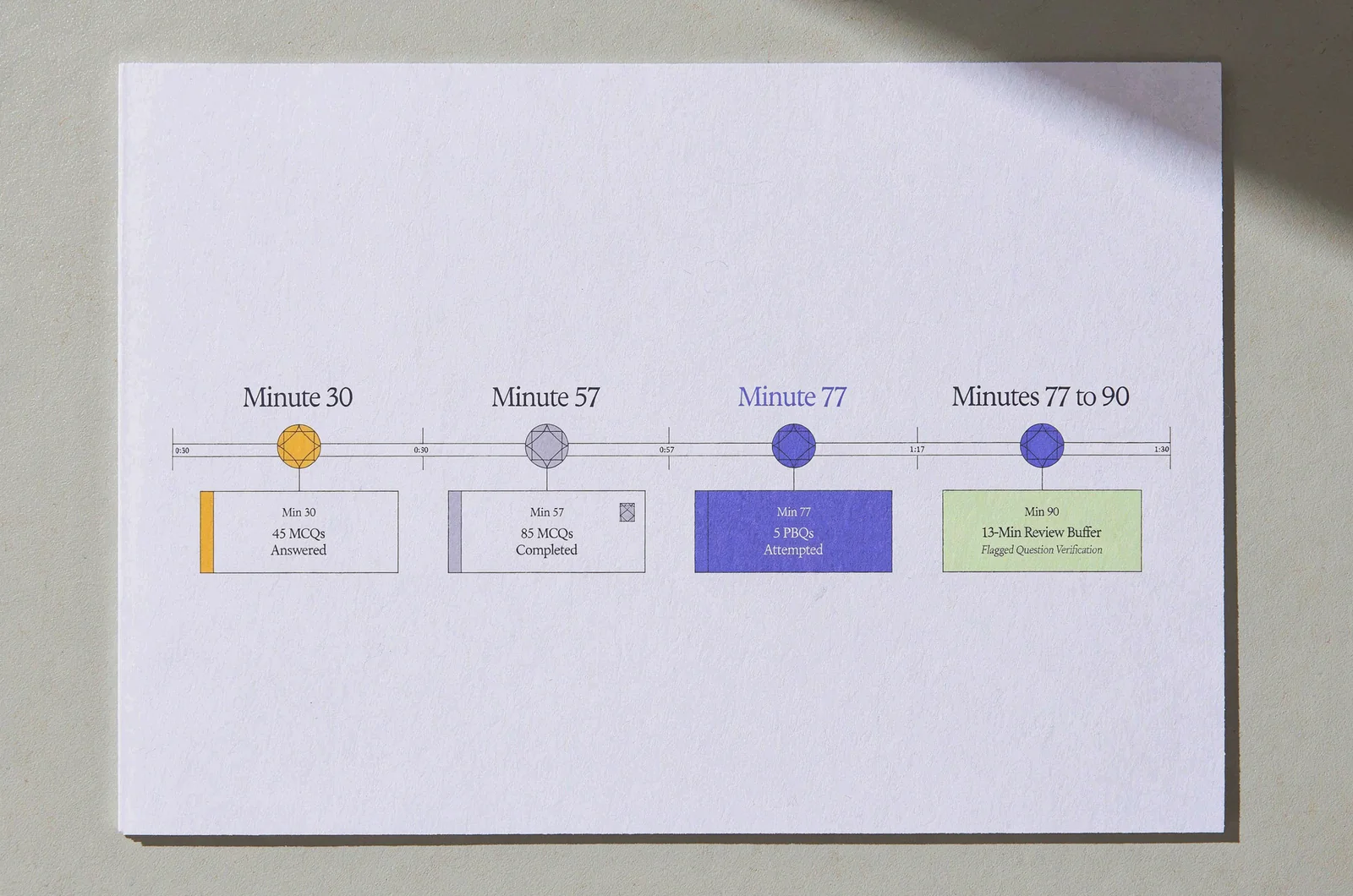
Start from the planning numbers above: five PBQs at four minutes each, 85 multiple-choice questions at about 40 seconds each, multiple choice first. The clock then looks like this:
- Minute 30: about 45 multiple-choice questions answered.
- Minute 57: all 85 answered once, with unsure ones flagged.
- Minute 77: all five PBQs attempted.
- Minutes 77 to 90: 13 minutes for flagged questions and unfinished PBQs.
These are my planning numbers, not CompTIA's. If a checkpoint slips by more than five minutes on two runs in a row, drill that domain in short sets instead of taking another full test.
One free-test guide on gcppcatest.com (March 2026) adds a rule for multiple choice. If a question runs past 90 seconds, make your best guess, flag it, and move on. Its reasoning is that a blank scores zero while a guess on a four-option item has a one-in-four chance. That figure assumes four options.
If you'd rather not do arithmetic mid-run, a small estimator helps. Enter the PBQ count, minutes per PBQ, and total questions, and it returns seconds per multiple-choice item plus checkpoint minutes. Three spreadsheet cells can do it.
Review the run, not just the score
Review every miss by domain, as Team Creative Lab advises, and review lucky guesses too. CertQuiz's SY0-701 four-week schedule (August 6, 2026) points out that a lucky guess hides a knowledge gap as well as a wrong answer does.
The objectives weight the five domains unevenly: General Security Concepts 12%, Threats, Vulnerabilities, and Mitigations 22%, Security Architecture 18%, Security Operations 28%, and Security Program Management and Oversight 20%. On a 90-question form, 28% is roughly 25 questions. A weak Security Operations result therefore costs more than a weak General Security Concepts result, which is about 11 questions. Treat these counts as estimates, since PBQs won't divide neatly by domain.
For the percentage-to-question-count math on another exam, see our breakdown of CISA domain weights. When one domain keeps dragging your timed score, our Security+ practice tests by domain let you drill it before the next full run.
Checking that a practice test's clock is honest
Timing advice only works if the tool you practice on matches the exam. Check four things: how many questions the set contains, whether PBQs sit inside the timed run, whether the timer can be paused, and whether wrong answers come with explanations.
PBQs are the weak spot. FigigExams, in an October 2026 comparison of Security+ PBQ simulators, puts it this way:
Every Security+ prep vendor now says it has performance-based questions. They do not mean the same thing: a bank of drills, a virtual machine lab, PBQs printed in a book, or PBQs placed inside a timed exam.
— FigigExams, Best Security+ PBQ Simulators (October 2026)
Only the last option trains the clock split described above. A comparison page from a prep brand deserves some caution on its rankings, but the distinction holds up.
Question count is the second check. ExamByExam's free Security+ practice test is titled as a 50-question set with explanations. That's a useful half-length drill and a poor test of 90-minute stamina. At the other end, FlashGenius lists a free SY0-701 question bank of 1,158+ questions and PBQs, going by its title. A deep bank helps with coverage. Its size says nothing about whether the timer or PBQ placement matches the real exam, so check those separately.
Treat one claim carefully. The gcppcatest.com guide says research from CompTIA's own learning division shows that candidates who complete at least five full practice exams have a significantly higher first-attempt pass rate. The page, as quoted, names no study. Nobody can promise a pass from a practice count, so I'd read the five-exam figure as that site's opinion.
Match each tool to its job. On PrepHoot, study mode explains the answers, flashcards drill recall, and timed mode is for the pacing runs. Our piece on flashcards and timed exams covers how the two train recall and pacing differently.
Book SY0-701 now or wait for V8?
CompTIA's own page sets the baseline: V7 remains a strong option if you're ready to certify now. The harder question is when you'll be ready.
Start with the calendar. November 17 is about 40 days from today. A four-week plan like CertQuiz's SY0-701 schedule, started today, ends around November 5. An eight-week plan like Team Creative Lab's ends around December 3. The cited sources don't say when V7 stops being offered, so a December finish doesn't automatically mean a V8 exam. Confirm the V7 retirement date on CompTIA's page before you book.
Here's the analysis. If your timed scores are already stable, the checkpoints above are your remaining work, and V7 fits. If you're starting from zero, you may prefer to wait for the V8 objectives and study against those. CompTIA says V8 expands coverage of AI-related risks, security operations, and modern environments. A bank labeled SY0-701 maps to V7. It's reasonable to expect question banks to be updated once V8 ships, but nothing cited here confirms how or when.
A cheap way to decide is to take PrepHoot's free Security+ sample questions as a baseline, then run one timed set and see where your checkpoints land.
Watch four things as November approaches: the V8 objectives, its exam code, its question count and time limit, and its PBQ share. If the 90-minute limit moves, redo the checkpoint math from scratch.
Straight answers about the SY0-701 clock
Did the SY0-701 time limit change?
Nothing cited here reports a change. CompTIA's objectives list a maximum of 90 questions in 90 minutes. What shifts your pace is how many of those 90 are PBQs.
Do PBQs count toward the 90 questions?
Yes. Prep guides from CertQuiz and BestExamApps describe SY0-701 as up to 90 questions that mix multiple-choice with PBQs, all within one 90-minute session.
How many full timed runs are enough?
Team Creative Lab's plan says at least two in the final two weeks. That's one author's recommendation, not a CompTIA rule, and no run count guarantees a result.
Can I pause a practice run to look something up?
Not if you want honest pacing data. Run it with 90 minutes, no notes, and no pausing, then review every lookup afterward.
More on practice realism and prep spend
- Free Salesforce Admin Practice Exam Scenarios Ranked by Realism
- PCES-30 Exam Cost vs Prep Spend: Where the Money Goes
- Security+ Domain Practice Tests
Try the free sample questions, then create a free account or purchase full access or a membership for the exam they are preparing for. Get started |  |